Level Up Your Loyalty Program with Custom Apple Wallet Passes
Unlock a new level of customer engagement with fully customizable Apple Wallet passes! Create beautiful, branded digital loyalty cards that live on your customers' iPhones.

We are incredibly excited to announce a powerful new way to connect with your customers: Custom Apple Wallet Passes!
In today's mobile-first world, convenience is king. Physical loyalty cards are easily lost or forgotten, but a digital pass lives securely in your customer's Apple Wallet, making it accessible with a simple tap. This new feature allows you to create stunning, on-brand digital loyalty cards directly from your dashboard.
Why Your Business Needs Apple Wallet Passes
Integrating your loyalty program with Apple Wallet isn't just a trend; it's a strategic move to enhance customer experience and keep your brand top-of-mind.
- ✨ Boost Customer Convenience: Your loyalty card is always with your customers, right on their iPhone. No more "I forgot my card" moments at the checkout.
- 🎨 Deep Brand Customization: Take full control over the look and feel. Adjust the background, text, and label colors, and upload your own logo and a beautiful strip image to create a pass that perfectly matches your brand's identity.
- 🚀 Increase Engagement: A permanent spot in your customer's digital wallet keeps your brand visible and encourages repeat business.
- 🌍 Go Green: Reduce your carbon footprint by moving away from plastic cards. It's a win for your business and the planet.
Getting Started is Easy
We've made the setup process seamless. You can design and launch your custom Apple Wallet pass in just a few minutes.
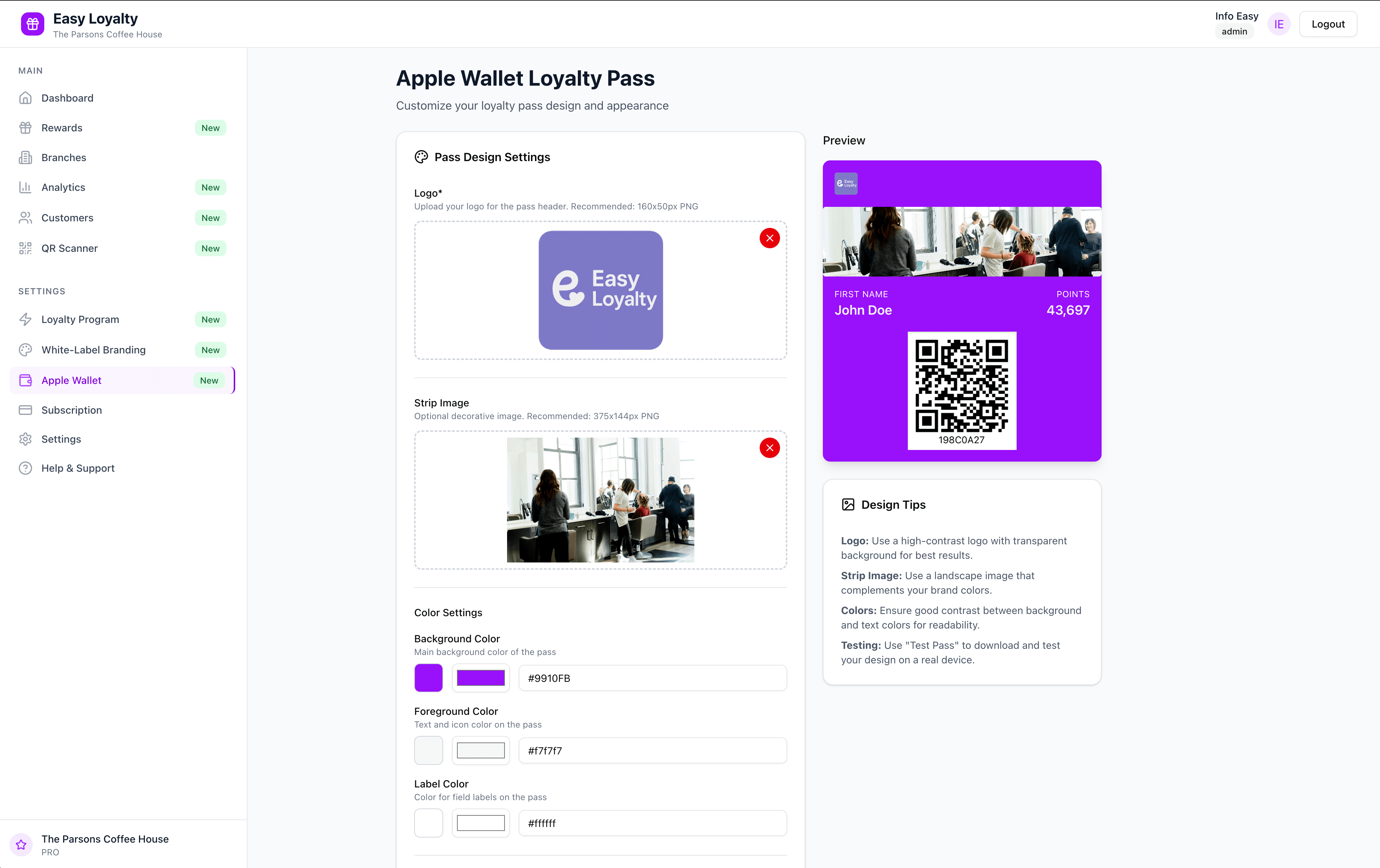
Here’s how to do it:
- Navigate to the "Apple Wallet" section in your dashboard sidebar.
- Unleash your creativity!
- Upload your Logo and a Strip Image.
- Pick your brand’s Background, Foreground, and Label Colors using our intuitive color picker.
- Watch your pass come to life in the live preview panel.
- Once you’re happy with the design, hit "Save Changes".
That's it! Your custom Apple Wallet pass is now ready to be distributed to your loyal customers.
A Glimpse of What You Can Create
Our live preview gives you an exact representation of how your pass will look on your customer's device, ensuring pixel-perfect design before you go live.
We are thrilled to bring this functionality to you and can't wait to see the amazing digital experiences you create.
Ready to build your own? Log in to your dashboard to get started!